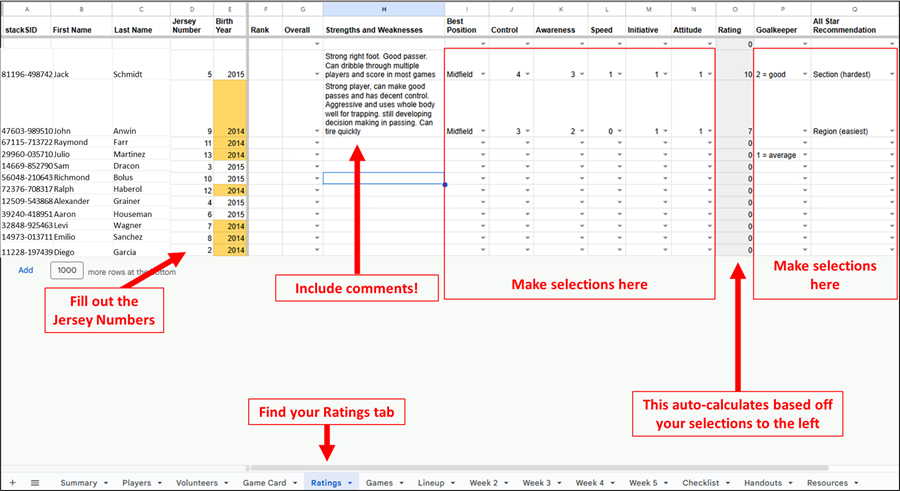
Each season, coaches in 10U-14U are asked to rate and share notes on every player on their roster.
These rankings help Region 13 create balanced teams, one of the core philosophies of AYSO. Ratings also help with All-Star selections. Here’s more on how to carry out player ratings:
- Go to the Ratings tab in your Team Google Sheet (tabs are across the bottom)
- Make sure your players’ names and jersey numbers are listed
- Assess each player following the Player Assessment Guidelines (Ratings column at the end will auto calculate)
- Rate your players against others of the same birth year
- Ratings are in comparison to ALL players in the division, not just your team
- Remember, an 11 is the BEST player in the DIVISION – average player is a 5
- Include notes in the strengths and weaknesses column! Example: Mike has great control and can dribble well, but is still learning how and when to pass. Has a powerful right foot kick but is unwilling to use his left foot.
- Complete All-Star Recommendations just for those you think should be in All Stars (Sectional level is the best, then Area, then Regional)
See screenshot below (fake info) that has started to fill out ratings: